Pharmacy
We fill new prescriptions and refills at no cost for covered medications for
- Active duty service members
- Active duty family members
- Retirees and their family members
- TRICARE beneficiaries
Learn more about eligibility for TRICARE pharmacy benefits.
Third Party Insurance Verification
Filling New Prescriptions
We fill prescriptions from both military and civilian providers.
Providers from Our Facility
Your provider may submit a prescription directly to the pharmacy during or after your appointment.
- You can activate the prescription(s) and wait, or
- You can come back later to pick them up.
Civilian Providers
If you have prescriptions from a TRICARE-authorized civilian provider:
- The provider can submit an electronic prescription to our pharmacy, or
- You can hand-carry a written prescription to our pharmacy. Note: This is the least preferred option.
To submit an electronic prescription:
Ask your provider to select the:
- Pharmacy name: DOD Beale EPHCY
- NCPDP/NPI number: 5652537 / 1518366574
If you hand-carry a written prescription:
Check in at the kiosk. Follow on-screen prompts to check in.
Note: There may be longer wait times for written prescriptions.
Activating New Prescriptions
There are multiple ways to activate your prescription.
Option 1: Preferred
Scan the QR code below or go to:
https://cxmlink.com/DHAMTF5622
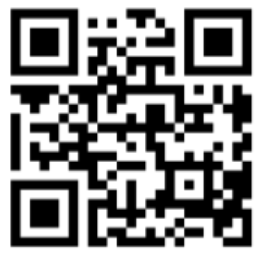
Follow the prompts on your mobile device.
See this
Q-Anywhere brochure for detailed
Frequently Asked Questions about Q-Anywhere.
Option 2: Text
Text Get In Line to 1-877-834-0036
Follow the prompts on your mobile device.
Option 3: In Person
Go to the Beale Pharmacy. Then, you’ll check in at the kiosk.
- Follow on-screen prompts to check in.
- If checking in after 4, we ask that you return the next duty day after 10 a.m. for pick up.
- To get text updates, you’ll need to enter your cell phone number.
NOTE: We do not activate prescriptions over the phone or via MHS GENESIS Patient Portal Secure Messaging.
Requesting Prescription Refills
We have three ways to refill your prescriptions:
Option 1: Online
- Log in to the MHS GENESIS Patient Portal and select the Rx Refills tab.
- Select the medication(s) you want to refill.
- Follow the prompts to select where you want to pick it up.
- You’ll be given a date and time when your refill(s) will be ready to pick up.
Note: If you’re not a registered user, you’ll need to sign up first.
Option 2: By Phone
- Call our pharmacy refill line at 1-530-424-2470. Then, follow the prompts to select where you want to pick up your refills.
- If enrolled in text message alerts, you’ll get a text notification when your refills are ready to pick up.
Option 3: In Person
Take a ticket from the kiosk. Processing time varies based on pharmacy staffing and resources.
Picking Up Your Prescriptions
You’ll need a valid uniformed services ID card to pick up a prescription. This includes children aged 10 and older. Prescriptions not picked up will be returned to stock after 10 business days. If you can’t pick up your prescription within this timeframe, please contact the pharmacy. If you’re picking up a prescription for another person, please bring that person’s valid uniformed services ID (or photocopy, digital picture).
- Check in at the kiosk for pick up after you have already activated your prescription.
Drug Take Back Program
Proper disposal of prescription drugs reduces the risk of unintentional poisoning, drug abuse, and environmental harm.
If you want to dispose of unwanted or unneeded drugs:
- Drop them in the secure bin located Beale Pharmacy Lobby
Several exclusions apply. This includes:
- syringes
- needles
- liquids greater than 4 ounces
Also, if a medication appears on the
FDA Flush List, it may be disposed by flushing.